 VoxTexto.
Record with your microphone, then transcribe
A short test lets you check sound before a longer note. The recording stays on your device.
Before starting
Open VoxTexto over HTTPS in an updated browser. Connect your microphone or headset and check its mute switch. Your operating system may also require permission. Managed devices may restrict microphone access.
Make a ten-second test
- Choose Record with microphone.
- Allow microphone access for this site. If you deny it, the app displays a recoverable message; change the site's permission and try again.
- Speak at a consistent distance. The timer and input-level indicator help confirm that capture is active.
- Choose Stop and review, then listen before transcribing.
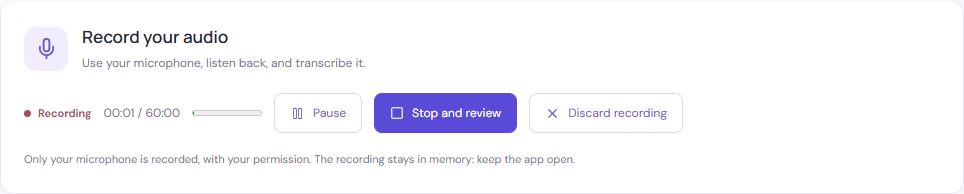
Pause, resume or discard
Pause temporarily stops capture and active time does not increase. Resume continues the same recording. Discard recording asks for confirmation and keeps the audio or text that existed before capture began. Save edited text before replacing it.
Save audio separately from text
After stopping, listen and use Save audio to download the recording. The browser chooses a supported format, such as WebM or M4A; it is not necessarily MP3. TXT, Word and PDF downloads contain text instead. Session audio is not saved automatically when you close the page.
If you cannot hear anything
Check the system's selected input and the browser's microphone permission. Close another app that is blocking the device and try again. A low meter reading alone does not prove that a file is empty: stop and listen to the test.
Chrome microphone-permission help.
Limits and phone use
Recording stops at one hour of active audio or the internal size limit. Keep the page open and avoid locking the device. Switching apps, receiving a call or suspending the computer may interrupt capture. Adding the site to your home screen does not guarantee background recording.
Which sound is captured?
The website records your microphone with permission. It does not join meetings or automatically capture all phone audio. The Windows desktop app offers system audio as a separate source. Tell participants before recording a conversation.