 VoxTexto.
How to turn WhatsApp audio into text
Save the voice message as a file first. Open it in VoxTexto, select its spoken language and review the result before sharing.
What file do I need?
VoxTexto accepts audio files, not conversation links, backups or exported-chat ZIPs. Files must be at most 60 minutes and 100 MB. Voice messages may use OGG or Opus; those extensions do not by themselves indicate a broken file.
On iPhone: save a copy to Files
- Find a voice message you have permission to process.
- Touch and hold it and look for forwarding or sharing options. Depending on the version, select it before opening Share.
- If Save to Files is available, choose a folder you can find again. Otherwise use WhatsApp's chat-export procedure or download the audio on a computer.
- Open VoxTexto in Safari, choose Select audio and find that copy in Files. Playing the message in WhatsApp does not create a selectable copy automatically.
On Android: share or download the file
Select the voice message and look for sharing or saving options. Labels and locations vary by app version and manufacturer. Keep a copy that your browser's file picker can access. If it is unavailable, download the recording using WhatsApp Web on your computer and transcribe there.
If you export a chat
A chat export with media can contain messages, pictures and multiple recordings. Extract only the recording you need and listen to confirm it is the right one. Do not select the ZIP or chat text file in VoxTexto. Keep exports secure because they may contain other people's information.
WhatsApp official chat-export help. Menu paths can change. VoxTexto is not affiliated with WhatsApp.
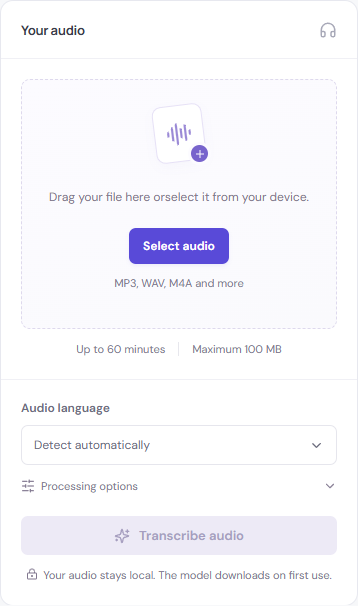
Choose the spoken language
Español / English changes the interface. Audio language controls recognition. If a Spanish voice is detected incorrectly, choose Spanish manually. The two regional Spanish settings share the recognition model.
If the browser rejects the file
Listen to the saved copy on your device first. If it is empty or unplayable, save it again. If it plays elsewhere but cannot be decoded in VoxTexto, a required codec may be unavailable. Try another browser or a genuine conversion to WAV or MP3 using a trusted tool. Renaming an .opus file to .mp3 does not convert its contents.
Review before forwarding
Check names, quantities and negations against the audio. Download the corrected text and share only with permission. VoxTexto cannot recover deleted WhatsApp audio or access conversations on its own.
Continue with fixing an incorrect transcript and choosing an export format.